
Table of Contents
What Is PHP? A Complete Beginner’s Guide to PHP in 2026
If you are beginning your journey into web development, you may have heard about PHP but wondered: what is PHP, and why is it still widely used in web development?
PHP is a popular server-side programming language designed primarily for building dynamic websites and web applications. It can process forms, communicate with databases, manage user sessions, generate dynamic content, and perform many other tasks required by modern websites.
In this beginner-friendly guide, you will learn what PHP is, how PHP works, its basic syntax, its relationship with HTML and MySQL, and how you can start learning PHP on your own computer.
What Is PHP?
PHP stands for PHP: Hypertext Preprocessor.
It is an open-source server-side scripting language commonly used for web development.
Unlike HTML, which is mainly responsible for structuring content in a browser, PHP code is executed on a web server.
The server processes the PHP code and sends the resulting HTML to the user’s browser.
For example:
<?php
echo "Hello World!";
?>
The visitor does not normally see the PHP code itself. Instead, the browser receives the result:
Hello World!
This server-side processing is one of the main characteristics of PHP.
How Does PHP Work?
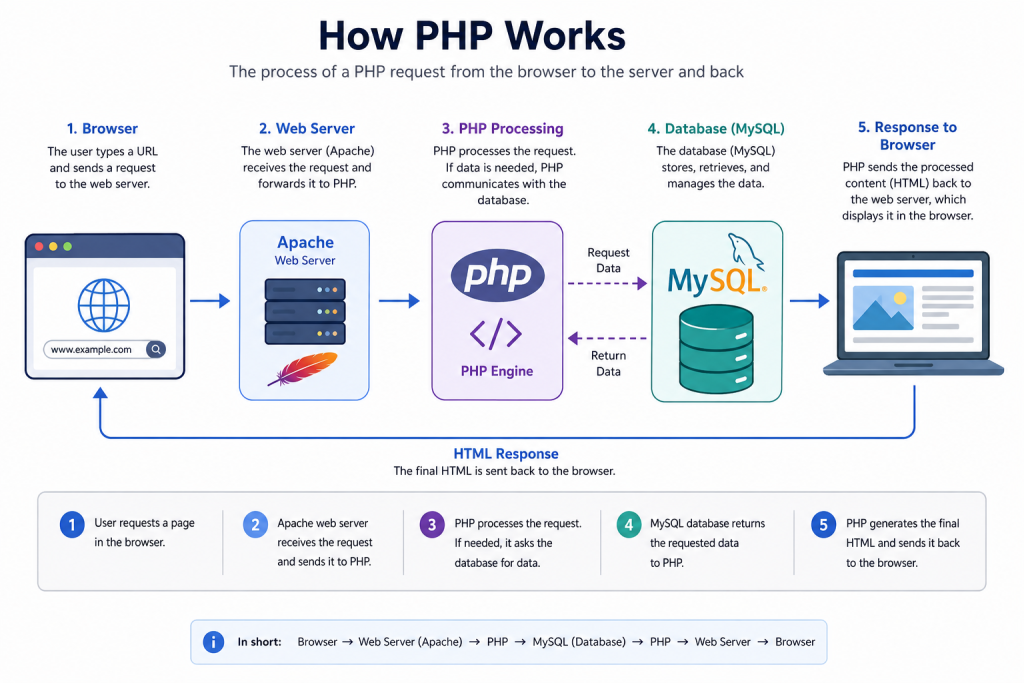
To understand PHP, it helps to understand what happens when someone visits a PHP website.
The basic process is:
Browser → Web Server → PHP → Database → HTML Response → Browser
For example, imagine a student opens a university portal.
The browser sends a request to the web server.
PHP receives and processes that request.
If information is required from a database, PHP communicates with a database system such as MySQL.
PHP then generates the appropriate response, usually HTML, and the web server sends that response back to the browser.
This entire process can happen in a fraction of a second.
What Is PHP Used For?
PHP can be used for many different web development tasks.
Some common uses include:
- Creating dynamic websites
- Processing HTML forms
- Building login and registration systems
- Connecting websites to databases
- Managing user sessions
- Creating dashboards
- Building content management systems
- Developing REST APIs
- Creating e-commerce websites
- Building school and university systems
- Developing hospital management systems
- Creating inventory systems
- Building booking systems
PHP is especially useful when a website needs to store, retrieve, update, or process information.
PHP vs HTML
Beginners sometimes confuse PHP and HTML, but they serve different purposes.
| Feature | PHP | HTML |
|---|---|---|
| Type | Programming/Scripting Language | Markup Language |
| Execution | Server | Browser |
| Dynamic Content | Yes | Limited |
| Database Connection | Yes | No |
| Variables | Yes | No |
| Conditions | Yes | No |
| Loops | Yes | No |
| Form Processing | Yes | Creates forms but does not process them |
| File Extension | .php | .html |
HTML creates the structure of a webpage.
PHP provides programming logic and dynamic functionality.
In real PHP websites, HTML and PHP are commonly used together.
PHP and HTML Together
A PHP file can contain both PHP and HTML.
For example:
<!DOCTYPE html>
<html>
<head>
    <title>My PHP Website</title>
</head>
<body>

<h1>Welcome to My Website</h1>

<?php
echo "<p>This content was generated by PHP.</p>";
?>

</body>
</html>
The HTML creates the page structure while PHP generates dynamic content.
This combination is one of the first skills beginners learn when studying PHP web development.
Basic PHP Syntax
PHP code normally begins with:
<?phpA simple PHP program could look like this:
<?php

echo "Welcome to PHP";

?>
The echo statement displays output.
Most PHP statements end with a semicolon:
;For example:
echo "Hello";Forgetting the semicolon where it is required can cause a syntax error.
PHP Variables
Variables allow you to store information.
PHP variables begin with the dollar sign $.
Example:
<?php

$name = "Ahmed";
$course = "Web Development";

echo $name;
echo $course;

?>
Here:
$name stores Ahmed
and
$course stores Web Development.
Variables become extremely important when working with forms, databases, login systems, and dynamic applications.
PHP Data Types
PHP supports several types of data.
Common examples include:
String
A string contains text.
$name = "Ahmed";Integer
An integer contains a whole number.
$age = 25;Float
A float contains a decimal number.
$price = 19.99;Boolean
A Boolean stores either true or false.
$isActive = true;Array
An array can store multiple values.
$students = ["Ahmed", "Ali", "Mohamed"];Understanding these data types is important as your PHP programs become more advanced.
PHP Conditions
Conditions allow PHP programs to make decisions.
For example:
<?php

$age = 20;

if ($age >= 18) {
    echo "You are an adult.";
} else {
    echo "You are under 18.";
}

?>
PHP checks whether the condition is true.
If $age is greater than or equal to 18, it displays:
You are an adult.
Otherwise, it displays:
You are under 18.
PHP Loops
Loops allow you to repeat code without writing the same statement multiple times.
For example:
<?php

for ($i = 1; $i <= 5; $i++) {
    echo "Number: $i <br>";
}

?>
The result will be:
Number: 1
Number: 2
Number: 3
Number: 4
Number: 5
Loops are useful when displaying database records, lists of products, students, users, and other repeated information.
PHP Functions
Functions allow developers to organize reusable pieces of code.
Example:
<?php

function welcomeUser($name) {
    return "Welcome, " . $name;
}

echo welcomeUser("Ahmed");

?>
The output will be:
Welcome, Ahmed
Instead of writing the same logic repeatedly, you can create a function and call it whenever needed.
PHP and MySQL
One of the most common combinations in web development is PHP and MySQL.
PHP handles application logic while MySQL stores information.
For example, a student management system might store:
- Student names
- Student IDs
- Courses
- Departments
- Grades
- Attendance records
PHP can retrieve this information from MySQL and display it on a webpage.
A basic PHP database connection might look like:
<?php

$conn = mysqli_connect(
    "localhost",
    "root",
    "",
    "school_db"
);

if ($conn) {
    echo "Database Connected";
}

?>
This ability to communicate with databases makes PHP suitable for many data-driven web applications.
What Is XAMPP?
When learning PHP, you need an environment capable of running PHP code.
One popular option for beginners is XAMPP.
XAMPP provides several tools in one package, including:
- Apache
- MariaDB
- PHP
- phpMyAdmin
Apache acts as the local web server, PHP processes PHP code, and MariaDB provides database functionality.
If you have not installed it yet, read our How to Install XAMPP on Windows 11 tutorial.
Internal link: Link the text “How to Install XAMPP on Windows 11” to:
How to Start Learning PHP
A beginner does not need to learn everything at once.
A practical learning order is:
- Learn basic HTML.
- Understand basic CSS.
- Install XAMPP.
- Learn PHP syntax.
- Learn PHP variables and data types.
- Practice conditions.
- Practice loops.
- Learn functions.
- Learn HTML forms.
- Learn PHP form processing.
- Learn MySQL.
- Learn PHP and MySQL connections.
- Practice CRUD operations.
- Learn sessions and authentication.
- Build complete projects.
The most important part is practice.
Reading PHP tutorials without writing and running code will make learning much slower.
Create Your First PHP Project
Once XAMPP is installed, you can create a project inside:
C:\xampp\htdocs
For example:
C:\xampp\htdocs\myproject
Create:
index.php
and add:
<?php

echo "My PHP Project is Working!";

?>
Then open:
http://localhost/myproject/
You should see:
My PHP Project is Working!
We already have a complete step-by-step tutorial for this process.
Read Create PHP Project in XAMPP: 10 Easy Steps for Beginners.
Internal link: Link that title to:
Advantages of PHP
PHP has several advantages for beginner and professional web developers.
Easy to Start
PHP syntax is relatively approachable for beginners.
You can write a small PHP program with only a few lines of code.
Free and Open Source
PHP can be used without purchasing a programming language license.
Database Support
PHP works with several database systems, including MySQL and PostgreSQL.
Large Community
PHP has been used for many years, so there is a large amount of documentation and learning material available.
Cross-Platform
PHP can run on Windows, Linux, and macOS environments.
Hosting Availability
PHP is supported by many web hosting providers.
Is PHP Still Used in 2026?
Yes.
PHP continues to be used for websites, web applications, APIs, content management systems, e-commerce platforms, and custom business systems.
PHP also powers WordPress, which remains a major content management system used across the web.
However, learning PHP should not mean ignoring other technologies.
A modern web developer can benefit from understanding:
- HTML
- CSS
- JavaScript
- SQL
- Git
- APIs
- Security fundamentals
PHP can then serve as one part of a broader web development skill set.
Is PHP Good for Beginners?
PHP can be a practical first server-side language for beginners.
You can quickly move from simple examples such as:
echo "Hello World";to practical projects involving:
- Forms
- Databases
- Authentication
- CRUD systems
- Dashboards
The ability to see results quickly can make PHP useful for learning backend web development concepts.
Common PHP Projects for Beginners
After learning the basics, try building small projects such as:
- Student Registration System
- Login and Registration System
- Contact Form
- To-Do Application
- Employee Management System
- Inventory Management System
- Library Management System
- Simple Blog
- Expense Tracker
- Appointment Booking System
Start with a small project and gradually add more functionality.
Common PHP Mistakes Beginners Make
Beginners often make several common mistakes.
Forgetting Semicolons
Incorrect:
echo "Hello"Correct:
echo "Hello";Saving the File as .html
PHP code should normally be stored in a .php file when PHP processing is required.
For example:
index.php
Opening PHP Files Directly
Do not simply double-click index.php and expect PHP to execute.
When using XAMPP, access the project through localhost:
http://localhost/myproject/
Forgetting to Start Apache
Apache needs to be running when executing PHP through XAMPP.
Ignoring Error Messages
PHP errors often provide useful information about what went wrong.
Read the error message before randomly changing your code.
Frequently Asked Questions
What does PHP stand for?
PHP stands for PHP: Hypertext Preprocessor.
Is PHP free?
Yes. PHP is open-source and free to use.
Is PHP frontend or backend?
PHP is primarily a server-side or backend programming language.
Can PHP work with HTML?
Yes. PHP and HTML can be used together in the same .php file.
Can PHP connect to MySQL?
Yes. PHP can connect to MySQL and other database systems.
Do I need XAMPP to use PHP?
No. XAMPP is one convenient option for creating a local PHP development environment, especially for beginners.
Can I build a complete website using PHP?
Yes. PHP can be used to build dynamic websites and web applications, especially when combined with HTML, CSS, JavaScript, and a database.
Is PHP difficult to learn?
The basics are relatively straightforward, but advanced application development still requires practice in databases, security, architecture, debugging, and other web development concepts.
Conclusion
So, what is PHP?
PHP is a server-side programming language used to create dynamic websites and web applications. It can process forms, work with databases, manage sessions, generate dynamic content, and provide backend functionality for many types of systems.
For beginners, a practical path is to learn basic PHP syntax first and then move toward forms, MySQL, CRUD operations, authentication, and complete projects.
If you are ready to practice PHP locally, start with these two tutorials:
How to Install XAMPP on Windows 11
and
Create PHP Project in XAMPP: 10 Easy Steps for Beginners
These will help you set up your local development environment and run your first PHP application.
External reference
At the end, link the words PHP official documentation to: